LinkedIn invitation limits in 2026 and how to pace them
What LinkedIn documents about invitation limits, what it leaves out, and how to pace invites per account: 15 a day by default, 80 a week, ceilings 25 and 100.
 GraphKit team
On this page
- What LinkedIn documents about invitation limits
- What LinkedIn does not publish
- GraphKit’s defaults and ceilings
- Why there is a weekly cap as well as a daily one
- Pacing inside the day
- Acceptance rate is the number to watch
- Pending invitations
- New accounts and recently restricted accounts
- What happens when LinkedIn says no
- Planning volume with these numbers
- A short checklist
LinkedIn limits how many connection invitations you can send, and it does not tell you the number. That makes “how many invites per day is safe” one of the most-asked questions in outbound and one of the least well answered. This post separates three things that usually get blended together: what LinkedIn actually documents, what nobody outside LinkedIn knows, and the pacing defaults we chose for GraphKit and why.
One caveat first, because it frames everything below. LinkedIn’s User Agreement (section 8.2) prohibits using bots or other unauthorised automated methods to add contacts or send messages, and its page on prohibited software says accounts that use such tools risk being restricted or shut down. No tool, including ours, can promise that an account will not be restricted. Pacing reduces risk; it does not remove it.
What LinkedIn documents about invitation limits
LinkedIn’s help article on invitation limits is short. These are the points it makes, in its own words where it matters:
- Everyone is limited. “All LinkedIn members, including those with Basic and Premium accounts, are subject to these limits.” Paying for Premium or Sales Navigator does not buy a higher invitation allowance.
- Hitting the limit restricts invitations, usually for a week. Your account “may be temporarily restricted from sending invitations”, the restriction “typically lasts one week”, and LinkedIn “cannot remove or shorten the wait period”.
- Withdrawing invitations does not help after the fact. “Withdrawing pending invitations will not remove the restriction.”
- Personalised notes are capped for free members. Basic members can include a personalised message on five connection requests per month. Premium members can add one to every request.
- LinkedIn’s advice is to send fewer, better invitations, ideally to people you know.
LinkedIn’s Professional Community Policies add one more rule that is directly relevant: do not use the invitation feature to send promotional messages to people you don’t know. That shapes what belongs in a connection note, which we cover in writing connection notes that get replies.
What LinkedIn does not publish
The number. LinkedIn gives no daily or weekly invitation figure anywhere in its help centre. The figures that circulate (“about 100 a week”, “around 200 a week”) come from vendors and practitioners comparing notes. Some of them are reasonable observations, but they are estimates, they change, and they vary by account. Treat any specific number as a starting assumption, not a rule.
What does seem consistent across those reports, and matches LinkedIn’s own advice, is that limits behave per account and react to how invitations are received. An account whose invitations are mostly ignored or rejected is in a worse position than one whose invitations are mostly accepted, at the same volume.
GraphKit’s defaults and ceilings
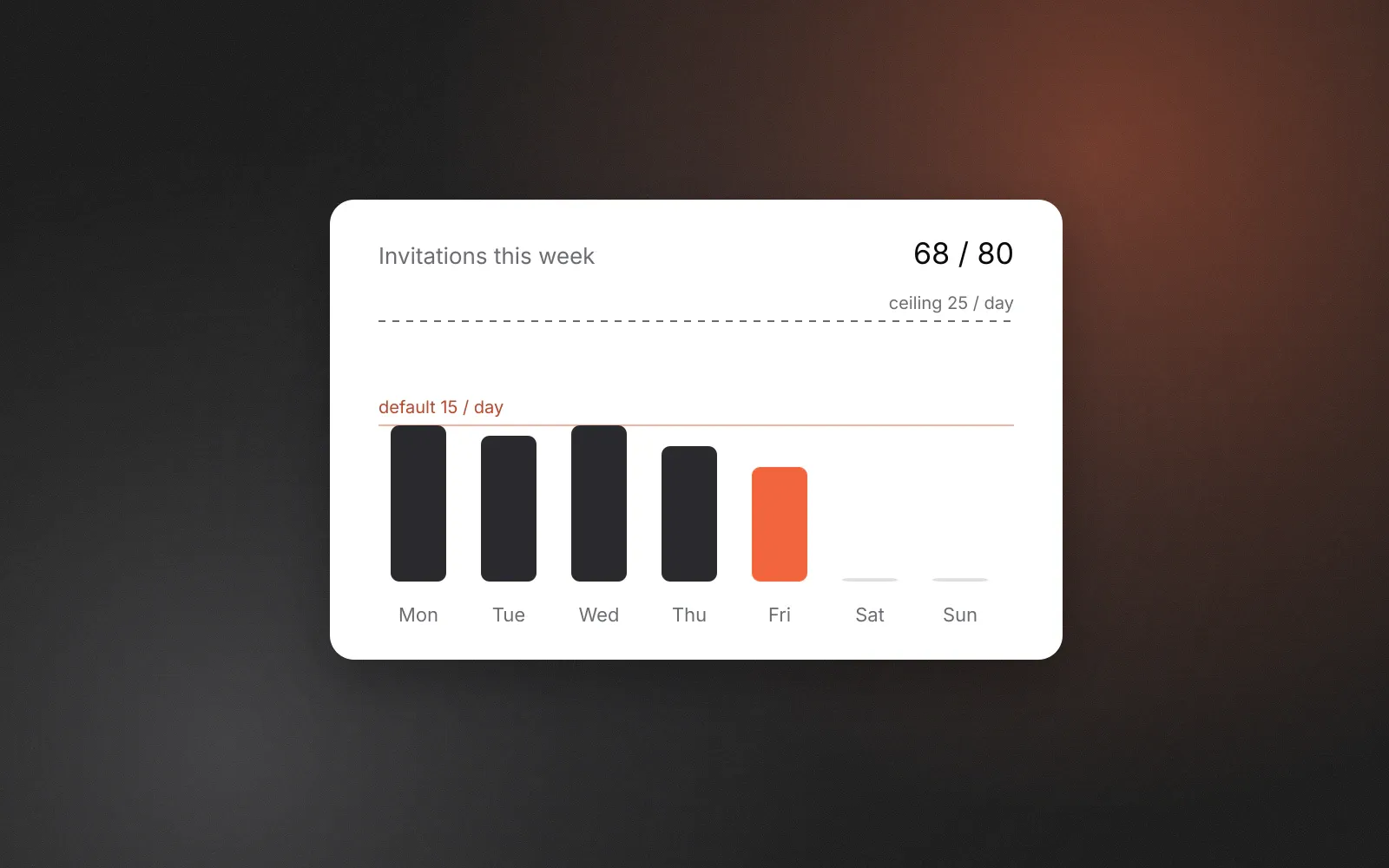
Because the platform number is unknown, we set conservative defaults and hard ceilings that no workspace can raise. They apply per connected LinkedIn account, across all campaigns that account runs in, so two campaigns cannot each spend a full allowance.
| Action (per account) | Default | Ceiling you cannot exceed |
|---|---|---|
| Invitations per day | 15 | 25 |
| Invitations per rolling week | 80 | 100 |
| Messages per day | 50 | 100 |
| Profile visits per day | 40 | 80 |
| InMails per day | 20 | Your InMail credits |
If you set a value above a ceiling, it is clamped. The weekly ceiling applies even if you never set a weekly limit. Setting a daily limit to zero turns that action off for the account. You can see and change these per account on the connected accounts screen.
Why there is a weekly cap as well as a daily one
A daily cap alone lets an account send its maximum every day, including weekends, which adds up quickly. The weekly cap is a rolling seven days: today plus the six days before it, in the account’s time zone. When the week is full, the next invitation waits (the step shows weekly_quota_exhausted) until enough old days roll out of the window.
At the defaults the two caps rarely fight. Fifteen a day across a five-day working week is 75, just under the weekly 80. They start to interact when you raise the daily number: at 25 a day, the weekly ceiling of 100 is reached on the fourth working day, and the account simply sends nothing more until the window moves on. That is intended. The weekly ceiling is what keeps a high daily setting from turning into a high weekly volume.
Pacing inside the day
How invitations are spread across a day matters as much as the daily count. A hundred actions fired in ten minutes looks nothing like a person working through a list.
GraphKit only acts inside the overlap of two windows: the account’s working hours (by default Monday to Friday, 09:00 to 18:00 in the account’s time zone) and the campaign’s schedule (by default Monday to Friday, 09:00 to 17:00). Both keep their wall-clock times across daylight-saving changes.
Inside that window, actions are spread rather than queued back to back. Each next action waits roughly the remaining open time divided by the remaining actions plus one, so a campaign that starts at 15:00 spreads its work over the two hours left instead of bursting. There is a minimum gap of two minutes between any two actions from the same account, and a small, bounded amount of jitter on top of the nominal gap. To be clear about the purpose: that jitter keeps many accounts from acting in lockstep. It is not designed to disguise automation, and we don’t describe it that way.
Acceptance rate is the number to watch
The daily count is the number people argue about. The acceptance rate is the one that tells you whether an account is in trouble.
GraphKit pauses a LinkedIn account automatically when its invitation acceptance falls below 15% over the last seven days, once it has sent at least 30 invitations in that period, and notifies the workspace. The threshold is ours, not LinkedIn’s. It exists because a low acceptance rate usually means the targeting or the note is wrong, and sending more of the same rarely fixes that.
When an account is paused for low acceptance, look at three things before resuming:
- Who you are inviting. Are these people who have a reason to know your name, or a scraped list that loosely matches a job title?
- Your profile. The person deciding whether to accept looks at your headline and photo, not your sequence.
- The note, or the absence of one. A specific one-line reason usually beats a pitch. More on that in connection notes and follow-ups.
Pending invitations
Old pending invitations accumulate. GraphKit does not withdraw them automatically today (it is on our roadmap as a step option), and LinkedIn says withdrawing them does not lift a restriction once you have one. Withdrawing invitations that have sat unanswered for weeks is still sensible housekeeping, done manually and before you run into a limit. A campaign can also branch on “still pending after N days” so a lead who never accepts gets a different path rather than a second invitation. GraphKit never sends a second invitation to someone who already has one pending, or who is already connected.
New accounts and recently restricted accounts
GraphKit has no automatic warm-up or ramp schedule for new accounts. That is a deliberate gap we would rather state than paper over. Our recommendation, which again is not a platform rule, is to start a new or newly connected account well below the default (five to ten invitations a day for the first two weeks) and raise it only while acceptance stays healthy. The same applies to an account coming back from a restriction.
What happens when LinkedIn says no
If LinkedIn refuses an invitation because the account has hit a limit, GraphKit treats the step as out of quota for that account and retries it on the account’s next quota day. Rate-limit responses are retried with back-off, and an action whose outcome is unknown is reconciled against the platform rather than resent blind. If LinkedIn restricts the account, its status changes to restricted and campaigns stop using it until you resolve it.
Planning volume with these numbers
Because limits are per account, capacity is a function of how many accounts you connect, not of a setting you turn up. At the defaults, one LinkedIn account sends up to 75 invitations in a normal working week (the weekly cap of 80 leaves a little room for a sixth day if you schedule one).
| Connected LinkedIn accounts | Invitations per week at defaults | Per four-week month |
|---|---|---|
| 1 | about 75 | about 300 |
| 5 | about 375 | about 1,500 |
| 20 | about 1,500 | about 6,000 |
If the plan needs more than that, the honest options are more accounts (each owned by a real person who agreed to it), better targeting so each invitation counts, or other channels for people who have already shown interest. Pricing is per connected account, so the cost of adding capacity is predictable.
A short checklist
- Keep each account at or below 15 invitations a day until you have a few weeks of acceptance data.
- Leave the weekly cap on. It is what makes a higher daily setting safe to try.
- Start new and recovering accounts lower, and raise slowly.
- Watch acceptance, not just volume. Below 15% for a week, stop and fix the list or the note.
- Withdraw stale pending invitations by hand, before you need to.
- Never put a pitch in an invitation. Save it for after the connection, if at all.
GraphKit is not affiliated with or endorsed by LinkedIn. For how we handle account connections and platform risk in general, see the platforms section of our security page.
Frequently asked questions
What is the official LinkedIn weekly invitation limit?
LinkedIn does not publish one. Its help page says every member, Basic or Premium, is subject to invitation limits, and that hitting them can restrict invitations for about a week. Any specific weekly figure you read is a third-party estimate.
Does Premium or Sales Navigator raise the invitation limit?
LinkedIn says the limits apply to Basic and Premium members alike. Premium changes how many personalised notes you can attach: free members can add a note to five connection requests a month, Premium members to all of them.
Will withdrawing old invitations lift a restriction?
No. LinkedIn states that withdrawing pending invitations does not remove a restriction, and that it cannot shorten the wait. Withdrawing stale invitations is still good housekeeping, but do it before you hit a limit, not after.
What does GraphKit do when LinkedIn refuses an invitation?
The step is treated as out of quota for that account and retried on the account’s next quota day. A restricted account is marked as restricted and is not used until you resolve it. Low acceptance pauses the account automatically.